
外观
代码助手 Agent
本教程将带你构建一个代码助手 Agent,支持流式输出、多轮对话和上下文管理。
你将学到
- 流式输出实现
- 多轮对话上下文管理
- 历史消息传递
- React 组件集成
最终效果
用户: 介绍一下 TypeScript 的泛型
助手: TypeScript 泛型是一种...(流式输出)

用户: 举个例子
助手: 下面是一个泛型函数的例子...(基于上下文继续对话)
第一步:创建项目
bash
mkdir chat-agent && cd chat-agent
bun init -y
bun add @multi-agent/a2a zod @langchain/openai
第二步:定义消息结构
创建 server.ts,定义对话消息的类型:
typescript
import { z } from 'zod'

// 历史消息结构
const messageSchema = z.object({
  role: z.enum(['user', 'assistant']),
  content: z.string(),
})

// 对话输入结构
const chatInputSchema = z.object({
  message: z.string().describe('用户消息'),
  history: z.array(messageSchema).optional().describe('历史消息'),
})

type ChatInput = z.infer<typeof chatInputSchema>
typescript
// server.ts
import { z } from 'zod'
// 历史消息结构
const messageSchema = z.object({
  role: z.enum(['user', 'assistant']),
  content: z.string(),
})
// 对话输入结构
const chatInputSchema = z.object({
  message: z.string().describe('用户消息'),
  history: z.array(messageSchema).optional().describe('历史消息'),
})
type ChatInput = z.infer<typeof chatInputSchema>
第三步:创建 LLM 实例
typescript
import { ChatOpenAI } from '@langchain/openai'

const llm = new ChatOpenAI({
  model: 'gpt-4o-mini',
  temperature: 0.7,
})
typescript
// server.ts
import { z } from 'zod'
import { ChatOpenAI } from '@langchain/openai'

const messageSchema = z.object({
  role: z.enum(['user', 'assistant']),
  content: z.string(),
})

const chatInputSchema = z.object({
  message: z.string().describe('用户消息'),
  history: z.array(messageSchema).optional().describe('历史消息'),
})

type ChatInput = z.infer<typeof chatInputSchema>

const llm = new ChatOpenAI({
  model: 'gpt-4o-mini',
  temperature: 0.7,
})
第四步:实现对话 Handler
typescript
import { type Context } from '@multi-agent/a2a'

async function chatHandler(params: ChatInput, ctx: Context) {
  const { message, history = [] } = params

  // 1. 构建消息列表
  const messages = [
    { role: 'system' as const, content: '你是一个专业的代码助手。' },
    ...history.map(h => ({ role: h.role as 'user' | 'assistant', content: h.content })),
    { role: 'user' as const, content: message },
  ]

  // 2. 流式调用 LLM
  let fullResponse = ''
  for await (const chunk of await llm.stream(messages, { signal: ctx.signal })) {
    const content = chunk.content as string
    fullResponse += content
    ctx.stream.send({ type: 'progress', text: content })
  }

  // 3. 返回完整响应
  ctx.stream.send({
    type: 'done',
    text: '回复完成',
    data: { response: fullResponse },
  })
}
typescript
// server.ts
import { z } from 'zod'
import { ChatOpenAI } from '@langchain/openai'
import { type Context } from '@multi-agent/a2a'

const messageSchema = z.object({
  role: z.enum(['user', 'assistant']),
  content: z.string(),
})

const chatInputSchema = z.object({
  message: z.string().describe('用户消息'),
  history: z.array(messageSchema).optional().describe('历史消息'),
})

type ChatInput = z.infer<typeof chatInputSchema>

const llm = new ChatOpenAI({
  model: 'gpt-4o-mini',
  temperature: 0.7,
})

async function chatHandler(params: ChatInput, ctx: Context) {
  const { message, history = [] } = params
  // 1. 构建消息列表
  const messages = [
    { role: 'system' as const, content: '你是一个专业的代码助手。' },
    ...history.map(h => ({ role: h.role as 'user' | 'assistant', content: h.content })),
    { role: 'user' as const, content: message },
  ]
  // 2. 流式调用 LLM
  let fullResponse = ''
  for await (const chunk of await llm.stream(messages, { signal: ctx.signal })) {
    const content = chunk.content as string
    fullResponse += content
    ctx.stream.send({ type: 'progress', text: content })
  }
  // 3. 返回完整响应
  ctx.stream.send({
    type: 'done',
    text: '回复完成',
    data: { response: fullResponse },
  })
}
ctx.signal
将 ctx.signal 传递给 LLM,用户取消时立即中断调用,避免不必要的 token 消耗。
第五步:配置 Agent Server
typescript
import { createAgentServer, type AgentConfig } from '@multi-agent/a2a'

const config: AgentConfig = {
  agentId: 'chat-agent',
  name: 'Chat Agent',
  version: '1.0.0',
  description: '代码助手 Agent,支持多轮对话',
  address: 'a2a://0.0.0.0:50054',
  skills: [
    {
      name: 'chat',
      description: '与用户进行对话',
      handler: chatHandler,
      inputSchema: z.toJSONSchema(chatInputSchema),
    },
  ],
  defaultSkill: 'chat',
}

const server = createAgentServer(config)
await server.start()
console.log('Chat Agent 已启动: localhost:50054')
typescript
// server.ts
import { z } from 'zod'
import { ChatOpenAI } from '@langchain/openai'
import { createAgentServer, type AgentConfig, type Context } from '@multi-agent/a2a'

const messageSchema = z.object({
  role: z.enum(['user', 'assistant']),
  content: z.string(),
})

const chatInputSchema = z.object({
  message: z.string().describe('用户消息'),
  history: z.array(messageSchema).optional().describe('历史消息'),
})

type ChatInput = z.infer<typeof chatInputSchema>

const llm = new ChatOpenAI({
  model: 'gpt-4o-mini',
  temperature: 0.7,
})

async function chatHandler(params: ChatInput, ctx: Context) {
  const { message, history = [] } = params

  const messages = [
    { role: 'system' as const, content: '你是一个专业的代码助手。' },
    ...history.map(h => ({ role: h.role as 'user' | 'assistant', content: h.content })),
    { role: 'user' as const, content: message },
  ]

  let fullResponse = ''
  for await (const chunk of await llm.stream(messages, { signal: ctx.signal })) {
    const content = chunk.content as string
    fullResponse += content
    ctx.stream.send({ type: 'progress', text: content })
  }

  ctx.stream.send({
    type: 'done',
    text: '回复完成',
    data: { response: fullResponse },
  })
}

const config: AgentConfig = {
  agentId: 'chat-agent',
  name: 'Chat Agent',
  version: '1.0.0',
  description: '代码助手 Agent,支持多轮对话',
  address: 'a2a://0.0.0.0:50054',
  skills: [
    {
      name: 'chat',
      description: '与用户进行对话',
      handler: chatHandler,
      inputSchema: z.toJSONSchema(chatInputSchema),
    },
  ],
  defaultSkill: 'chat',
}
const server = createAgentServer(config)
await server.start()
console.log('Chat Agent 已启动: localhost:50054')
第六步:创建测试客户端
创建 client.ts:
typescript
// client.ts
import { createAgentClient } from '@multi-agent/a2a'

// 1. 创建客户端
const client = createAgentClient({
  agentId: 'chat-agent',
  address: 'a2a://localhost:50054',
})

// 2. 维护对话历史
const history: { role: 'user' | 'assistant'; content: string }[] = []

async function chat(message: string) {
  // 3. 调用技能
  const stream = await client.call('chat', { message, history })

  // 4. 处理响应
  let response = ''
  for await (const msg of stream) {
    if (msg.type === 'progress') {
      process.stdout.write(msg.text)
      response += msg.text
    }
    if (msg.type === 'done') {
      console.log()
    }
  }

  // 5. 更新历史
  history.push({ role: 'user', content: message })
  history.push({ role: 'assistant', content: response })
}

// 模拟多轮对话
await chat('介绍一下 TypeScript 的泛型')
await chat('举个例子')
await chat('如何约束泛型类型?')

// 6. 关闭连接
await client.close()
第七步:运行
bash
# 终端 1
bun run server.ts

# 终端 2
bun run client.ts
输出:
用户: 介绍一下 TypeScript 的泛型
助手: TypeScript 泛型是一种在定义函数、接口或类时不预先指定具体类型...

用户: 举个例子
助手: 下面是一个泛型函数的例子:function identity<T>(arg: T): T { return arg; }...

用户: 如何约束泛型类型?
助手: 可以使用 extends 关键字来约束泛型类型,例如:<T extends string>...
进阶:React 集成
在浏览器中使用 Chat Agent:
tsx
import { useState, useRef } from 'react'
import { createAgentClient } from '@multi-agent/a2a/browser'

// 创建客户端(复用连接)
const client = createAgentClient({
  agentId: 'chat-agent',
  address: 'a2a://localhost:50054',
})

type Message = { role: 'user' | 'assistant'; content: string }

export const Chat = () => {
  const [messages, setMessages] = useState<Message[]>([])
  const [input, setInput] = useState('')
  const [loading, setLoading] = useState(false)
  const abortRef = useRef<AbortController | null>(null)

  const send = async () => {
    if (!input.trim() || loading) return

    const userMessage = input
    setInput('')
    setLoading(true)

    // 1. 添加用户消息
    setMessages(prev => [...prev, { role: 'user', content: userMessage }])

    // 2. 调用 Agent
    abortRef.current = new AbortController()
    const stream = await client.call('chat', {
      message: userMessage,
      history: messages,
    }, {
      signal: abortRef.current.signal,
    })

    // 3. 流式更新助手消息
    let response = ''
    setMessages(prev => [...prev, { role: 'assistant', content: '' }])

    for await (const msg of stream) {
      if (msg.type === 'progress') {
        response += msg.text
        setMessages(prev => [
          ...prev.slice(0, -1),
          { role: 'assistant', content: response },
        ])
      }
    }

    setLoading(false)
  }

  const cancel = () => {
    abortRef.current?.abort()
    setLoading(false)
  }

  return (
    <div className="chat-container">
      <div className="messages">
        {messages.map((m, i) => (
          <div key={i} className={`message ${m.role}`}>
            {m.content}
          </div>
        ))}
      </div>

      <div className="input-area">
        <input
          value={input}
          onChange={e => setInput(e.target.value)}
          onKeyPress={e => e.key === 'Enter' && send()}
          placeholder="输入消息..."
          disabled={loading}
        />
        <button onClick={send} disabled={loading}>发送</button>
        <button onClick={cancel} disabled={!loading}>取消</button>
      </div>
    </div>
  )
}
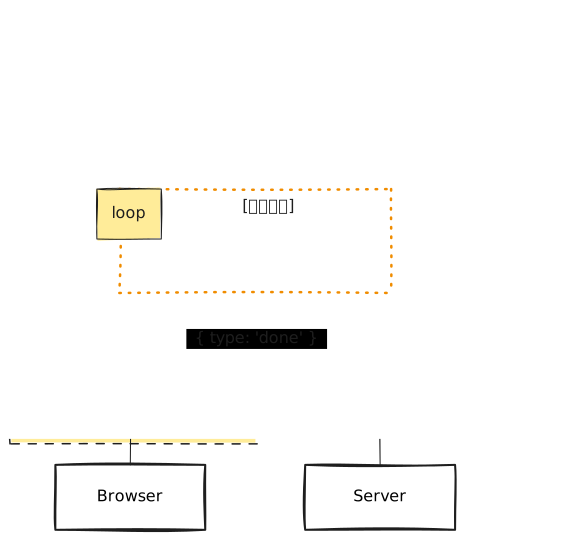
交互流程图
进阶:支持取消
用户可以在 AI 生成过程中点击取消:
typescript
const controller = new AbortController()

// 5 秒后自动取消
setTimeout(() => controller.abort(), 5000)

const stream = await client.call('chat', {
  message: '写一篇长文章',
}, {
  signal: controller.signal,
})

let response = ''
for await (const msg of stream) {
  if (msg.type === 'progress') {
    response += msg.text
  }
}
// 取消后,循环正常退出,response 包含取消前的内容
console.log(response)